Every copyable prompt from our lessons and builds, in one place. Filter by job, trade and level, copy with one click, and read the note on where each prompt fits. Each prompt comes from a lesson or build page, so you can see the full steps around it.
Looking for skills you can save and reuse, not just one-off prompts? See the Free Grok Bot skills library.
Free prompts: Every prompt on this site is free to copy and paste into Grok Bot. Browse the Free Grok Bot prompts library.
Start here
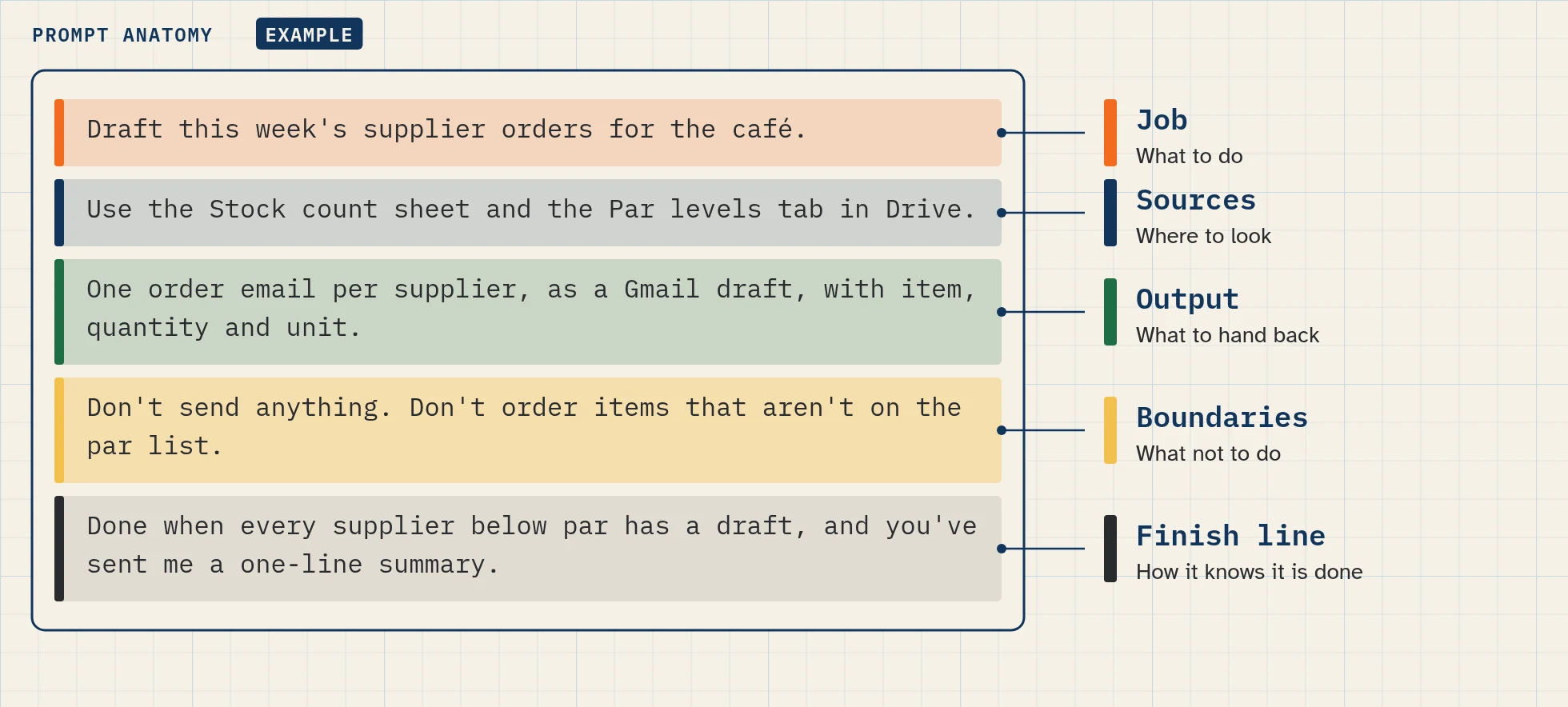
New to prompting? Read how to prompt a Grok Bot. It explains the five-part formula, Bot Agents 24’s own way of writing a clear prompt. Then copy this one:
Job: Summarize this document in five bullets.
Sources: Only the document I attached.
Output: Five bullets, then a separate list of every date, decision and open question.
Boundaries: Don't change the source file.
Finish line: Stop when the summary is ready and cite the section for each item.
(Adapted from the first-task example in the Grok Bot get-started docs.)
Prompt packs
Every prompt
Filters: job · trade · level · type (role and rules, first run, routine, correction).
(The filterable list fills from each lesson and build as it’s published. Until then, show the three cards below.)
- Role and rules, from set up your first Bot
- First run on test data, from the Lead Responder build
- Routine: buyer match (daily 08:00), from the Lead Responder build
Every page in this section
Free Grok Bot prompts
/free-prompts/How to triage your inbox with a Bot (prompt pack)
/prompts/inbox-triage/How to chase unpaid invoices with a Bot (prompt pack)
/prompts/invoice-chasing/How to automate everyday jobs: routine recipes
/prompts/routine-recipes/How to name your Bots (name ideas)
/prompts/bot-names/
FAQ
Can I use these prompts as they are?
Yes, but change the names, sources and limits to match your business. Try each one on made-up data first.
Why does every prompt say "don't send"?
Every build starts as draft-and-approve. You decide when a Bot may do more, one step at a time.
What's the difference between a prompt and a template?
A prompt is one message you paste. A template is a ready-made setup: lasting rules, skills and routine prompts together.
Sources
- Get started: https://docs.x.ai/grok-bot/get-started (checked Nov 4, 2026) (first-task example)
- Message and collaborate: https://docs.x.ai/grok-bot/chat-and-collaboration (checked Nov 4, 2026)