What this tool does
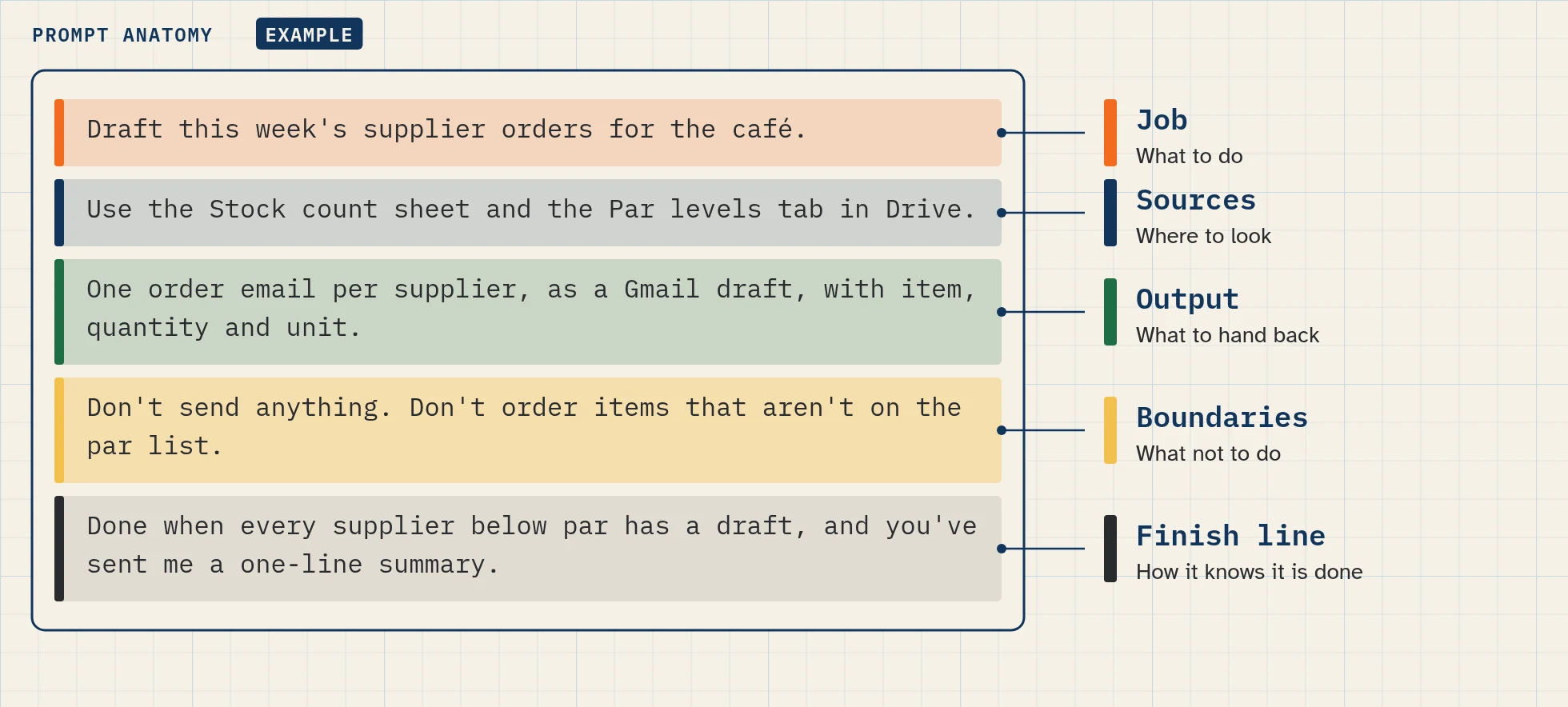
The prompt builder uses the five-part prompt formula from lesson 2.1: Job, Sources, Output, Boundaries and Finish line. This formula is a Bot Agents 24 framework, our own way of teaching prompts. It isn’t a Grok Bot feature or an xAI rule.
You fill in each part and the tool joins them into one prompt you can copy. You can also start from a preset, which is one of the starter prompts from our trade builds.
It’s for anyone who has made a first Bot and wants clearer results.
| Part | What you write |
|---|---|
| Job | The one task you want done |
| Sources | Where the Bot should look, for example one sheet or one folder |
| Output | What you want back, for example a draft or a short list |
| Boundaries | What the Bot must not do, for example “don’t send anything” |
| Finish line | How you both know the task is done |
How to use it
- Pick a preset, or start with empty boxes.
- Write one or two short lines in each of the five boxes.
- In Boundaries, keep at least one safety line, such as “Leave every message as a draft.”
- Copy the prompt.
- Paste it into your Bot’s chat, then check the result before you rely on it.
The Grok Bot docs give similar advice for working with a Bot: lead with the result you want, link the source of truth, say what the Bot may change and what needs your approval, and ask for evidence such as links or screenshots (source).
Runs in your browser only. Nothing you type is sent anywhere; answers are saved in this browser until you clear them.
Your privacy
This tool runs in your browser only. There are no form submissions, no accounts and no analytics on what you type, and it collects no personal data. Anything it remembers is kept in your browser’s local storage, with a visible Clear button. If JavaScript is off, you see the same content as a readable list or table.
FAQ
Is the five-part formula from xAI?
No. It’s the formula we teach on Bot Agents 24. It’s in line with the docs’ advice on clear requests, but the five names are ours.
Does the tool send my prompt to Grok Bot?
No. It only builds text in your browser. You paste it into the app yourself.
Do I need all five parts every time?
For a new task, yes. It makes the job, the limits and the finish line clear. For a quick follow-up in the same chat, one line is often enough.
Where do the presets come from?
They’re the starter prompts from our trade builds. Check them against your own business before you use them.
Related lessons
- How to prompt a Grok Bot (lesson 2.1, the full formula)
- How to give a Bot its role and lasting rules
- Prompt library
- How to set approvals and Auto Review
Sources
- Chat and collaboration (advice on clear requests): https://docs.x.ai/grok-bot/chat-and-collaboration (read Nov 4, 2026)