What this tool does
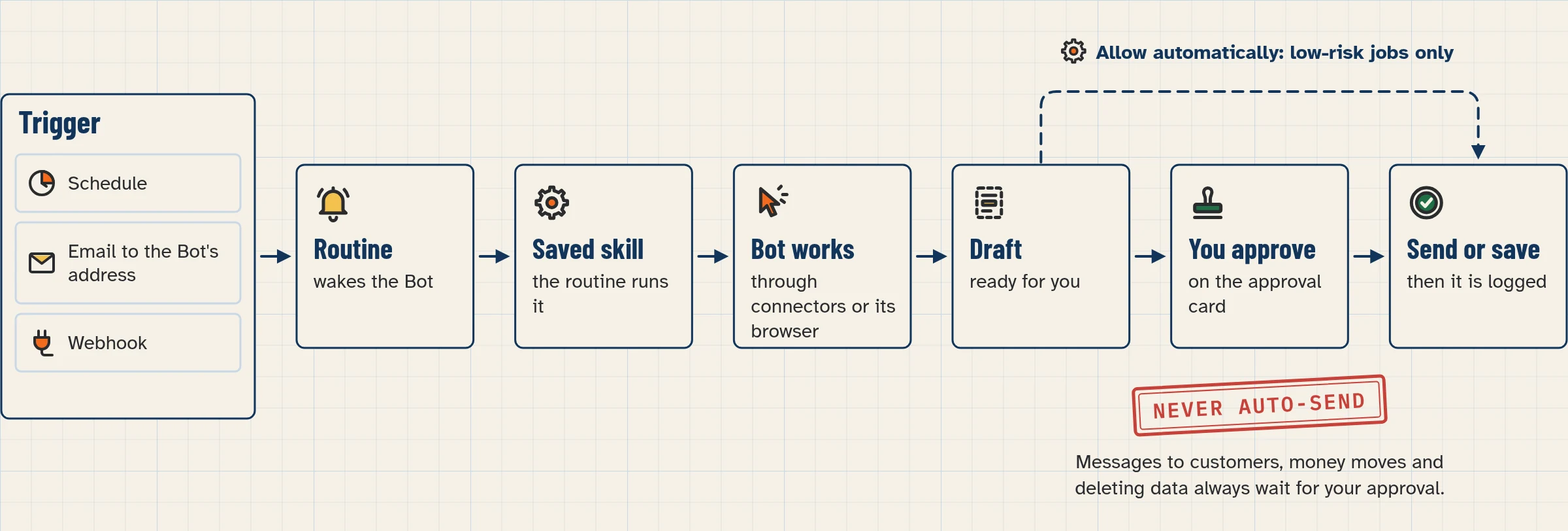
A routine tells one Bot when to run a job: on a schedule, or when something happens (source). This helper writes the request for you.
You choose one of two options:
- A schedule: the days, the time and the time zone.
- A trigger: an email or a webhook.
The tool gives you a routine prompt in plain words. Where it helps, it also shows the same schedule as a cron-style line, for reference only.
It’s for people who have a working skill and want it to run without being asked each time.
How to use it
- Choose Schedule or Trigger.
- For a schedule, pick the days, the time and the time zone. For a trigger, pick email or webhook.
- Type the name of the skill or job the routine should run.
- Copy the routine prompt and paste it into your Bot’s chat.
- In the app, open the routine and check that When to run shows what you meant. If it doesn’t, choose Edit and tell the Bot what to fix (source).
Good to know
- The docs say to ask for a schedule in plain words, like “every weekday at 8:00 AM” (source). The docs don’t mention cron. Treat the cron-style line as a reference for you, not something to paste.
- Schedules use the time zone in Settings, under Bot, labelled Timezone. Auto-detect follows your computer (source).
- A new routine waits for its next scheduled time. It doesn’t run when you create it. To try it right away, use Test, which needs the desktop app (source, mobile).
- An email trigger means an email to your Bot’s own address, not to your normal inbox (source).
- Every run uses usage (source).
Runs in your browser only. Nothing you type is sent anywhere; answers are saved in this browser until you clear them.
Use this as a starting point, then check how schedules are written in the app. See the routines lesson for the walkthrough.
Your privacy
This tool runs in your browser only. There are no form submissions, no accounts and no analytics on what you type, and it collects no personal data. Anything it remembers is kept in your browser’s local storage, with a visible Clear button. If JavaScript is off, you see the same content as a readable list or table.
FAQ
Will my routine run as soon as I create it?
No. It waits for its next scheduled time. Use Test in the desktop app to try it now (source).
Can a new email in my Gmail start a routine?
The docs list an email to your Bot’s own address as a trigger, not mail to your own inbox. Lesson 2.10 covers the Bot’s address.
Do I need to paste the cron-style line into Grok Bot?
No. Paste the plain-English prompt. The cron-style line is only there to help you check the timing.
Does my laptop need to stay open?
No. Routines run in the cloud, so closing the app or your laptop doesn’t stop them (source).
Should I make a skill first?
Yes. A skill says how to do the job, and a routine says when. Test the skill by hand before you schedule it (source).
Related lessons
- How to schedule a Bot with routines (lesson 2.8)
- How to start a routine from a webhook (lesson 2.9)
- How to teach a Bot a task (lesson 2.7, skills)
- Your Bot’s own email address (lesson 2.10)
Sources
- Skills, routines and automations: https://docs.x.ai/grok-bot/skills-routines-and-automations (fetched Nov 4, 2026, about 10:20 IST)
- Mobile: https://docs.x.ai/grok-bot/mobile (local copy, Nov 4, 2026)
- FAQ: https://docs.x.ai/grok-bot/faq (fetched Nov 4, 2026)